
Download Dale APK – manage finances, send money, pay bills, mobile wallet, Peru, financial tool, app for money management
Overview
Dale is a mobile financial tool designed for users in Peru who seek a bank-free way to manage their personal finances. The app enables users to perform a variety of financial activities directly from their smartphones, including sending money to any phone number, paying utility bills, recharging mobile data and balance, and making purchases at stores and wineries. It serves as a digital wallet alternative, allowing users to store and transfer funds without the need for a traditional bank account. The primary purpose of Dale is to provide financial inclusivity by offering accessible, low-friction services to individuals who may not have access to formal banking infrastructure or prefer to avoid bank-related processes.
Target users include mobile-first consumers, freelancers, remote workers, and individuals in urban and rural areas across Peru who rely on quick, on-the-go financial transactions. The app is especially useful for those who frequently send money to family members, pay recurring bills, or need to top up their mobile services without visiting a physical location. By integrating with local agents, Dale facilitates cash-in and cash-out operations, making it a practical solution for digital financial management in regions with limited banking access. The developer, GMoney, has positioned Dale as a lightweight, user-friendly alternative to traditional banking systems.
Key Features & Capabilities
- Money Transfers: Send funds instantly to any mobile number in Peru, ideal for family support or peer-to-peer payments.
- Bill Payments: Pay for electricity, water, and telephone services directly through the app without visiting service providers.
- Mobile Recharge: Recharge data plans and phone balance with a few taps, supporting all major mobile carriers in Peru.
- Agent Network Access: Deposit cash into the app via authorized local agents, enabling seamless cash-in functionality.
- Merchant Payments: Make purchases at participating stores, wineries, and shops using the app’s integrated payment system.
- Exclusive Promotions: Access special discounts and offers available only to Dale users, enhancing value and engagement.
These features collectively create a comprehensive financial ecosystem within a single application. For example, a user in Lima can send money to a relative in Cusco, pay their monthly electricity bill, and recharge their mobile data—all without leaving their home. Similarly, someone in a remote area can deposit cash at a local agent and use the funds to pay for services or make purchases. The app’s functionality is optimized for mobile-first users who value speed, convenience, and accessibility. It reduces dependency on physical bank branches and provides a digital alternative for financial management in underserved communities.
User Interface, Workflow & Performance
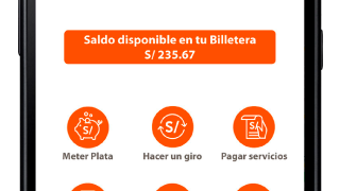
The user interface of Dale is designed with simplicity in mind, focusing on intuitive navigation and minimal steps for core transactions. The main dashboard presents essential functions such as sending money, paying bills, and recharging in a clearly labeled layout. Users can access these features with a single tap, reducing the learning curve for first-time users. The workflow follows a logical sequence: select action → enter recipient or service details → confirm and complete. This streamlined approach enhances usability, especially for users who are not tech-savvy.
Navigation is consistent across screens, with a bottom menu bar providing quick access to key sections. The app does not require complex setup or extensive onboarding, allowing users to start using it immediately after downloading. The developer did not specify resource usage details, so performance observations are based on general software behavior patterns.
However, the app’s 42.5 MB size suggests it is optimized for moderate device storage and memory usage. Stability appears to be maintained through regular updates, as evidenced by the current version (3.4.1). The app operates offline for viewing transaction history, but active transactions require an internet connection.
Compatibility & System Requirements
Dale is available for Android devices, with the current version being 3.4.1. The app has a file size of 42.5 MB, which is relatively compact for a financial utility with multiple features. This suggests it is designed to function efficiently on a wide range of Android devices, including those with lower-end specifications. However, exact system requirements were not listed, so users should ensure their device meets minimum Android compatibility standards to avoid installation issues.
Platform compatibility information is limited to Android, meaning the app is not currently available for iOS or other operating systems. The developer did not provide additional system requirements such as RAM, CPU, or minimum Android version. Users are advised to check the Google Play Store for device compatibility before downloading. Installation is straightforward, and the app integrates with standard Android security protocols, including Google Play Protect, to help safeguard user data.
Pros and Cons
Pros
- Free to download and use with no hidden fees
- Wide range of financial services in one app
- Supports cash-in through local agents for easy access
- Simple, intuitive interface suitable for all users
- Available on Google Play Store with regular updates
Cons
- Only available for Android devices
- No official information on system requirements or performance metrics
- Functionality limited to Peru, restricting broader use
- Dependent on agent network availability for cash deposits
- Offline functionality is limited to viewing history
FAQ Section
Is Dale available for iOS devices?
Dale is currently only available for Android. There is no official iOS version at this time.
Is the app safe to use?
The app is distributed through the Google Play Store, which includes security checks. However, users should always verify the developer name (GMoney) and avoid third-party sources.
How do I add money to my Dale account?
You can deposit cash into your Dale account by visiting an authorized local agent. The process is simple and does not require a bank account.
Can I use Dale without an internet connection?
While you can view your transaction history offline, active transactions such as sending money or paying bills require an internet connection.
What happens if I lose my phone?
It is recommended to secure your account with a strong password or PIN. If your device is lost, contact customer support immediately to prevent unauthorized access.
Final Thoughts + CTA
Dale stands out as a practical, accessible financial tool tailored for users in Peru who want to manage their money without relying on traditional banks. Its comprehensive suite of features—ranging from money transfers and bill payments to mobile recharges and merchant transactions—makes it a versatile solution for everyday financial needs. The app’s free model, simple interface, and agent-based cash-in system enhance its usability, particularly in areas with limited banking infrastructure. While its Android-only availability and lack of detailed system specifications are notable limitations, the app delivers strong value for its target audience.
For individuals seeking a secure, mobile-first alternative to banking, Dale offers a compelling option. It is ideal for freelancers, remote workers, and families who frequently send money or manage recurring payments. The combination of convenience, affordability, and local relevance positions Dale as a strong contender in the digital financial space. Download Dale APK now to take control of your finances—anytime, anywhere.







